Add pictures
Checked against GM-Apprentice 1.12.98.
Portraits, places, maps, handouts and scene pictures make a campaign site.
There are two ways to get them into your vault: bring your own, or
have the apprentice draw them. Either way the picture is filed in the
vault's _attachments/ folder and the note points at it, so it shows in
Obsidian and on the site.
What it costs
Section titled “What it costs”Bringing your own costs nothing. For drawing, you choose what draws, and the apprentice never picks for you:
| Choice | What draws | Money |
|---|---|---|
| Codex | An installed Codex, signed in with your ChatGPT plan | Nothing beyond the plan you already pay for |
| The agent's own tool | The agent's own image tool, when it has one (Codex running the skills, for example) | Nothing beyond the plan |
| A paid service | Google's Gemini (or another service) on your own API key | Paid per picture, inside spending limits you set in the vault |
Until you choose, it asks.
Two things to know before you choose Codex. If your ChatGPT account has bought extra Codex credits, Codex may spend them once the plan's allowance runs out; OpenAI bills that, outside the apprentice's limits. And if Codex stops part-way (the plan's limit reached, say), the apprentice tells you and stops. It never switches to a paid service by itself.
With a paid service, every picture is counted against limits in your vault settings, in US cents: by default at most 10 cents for one attempt, 200 for one batch and 2,000 in a month. Change them to suit you. It asks before it goes past any of them.
From a real run
Section titled “From a real run”On GM-Apprentice 1.12.98, using the Snowbound sample vault
(tag sample-v2), which is set to draw with Codex. We typed the GM's side;
the replies are the agent's own, trimmed ([...]) but not reworded.
Your own picture
Section titled “Your own picture”You type
I've got a picture for Pip Callow at ../pip.png. Use it as his portrait.
The apprentice
Pip Callow now has your picture as his portrait. I copied
../pip.pnginto the vault as_attachments/characters/pip-callow.pngand setportrait:inCharacters/NPCs/Pip Callow.mdto point at it, the same way the other characters' portraits are set up. The picture fits his description: a freckled teenage boy in a grey monk's habit.
It looks at the picture before filing it. Hand it a folder of pictures and it matches each one to the right note.
Drawing what's missing
Section titled “Drawing what's missing”You type
Thanks. Now fill in the missing pictures.
The apprentice
There are 6 notes with no picture (player characters not included): [...]
The vault is set to draw with Codex on your ChatGPT plan, so this costs no money. It should take about 6–10 minutes, roughly a minute or two per picture. I'll follow the campaign's Image Guidance note, keep each picture to what the players have seen or been told, and look at every one before filing it.
Shall I go ahead?
You type
Just Brother Matthias for now, please.
Then it stopped, because Brother Matthias is a secret:
The apprentice
I need a decision from you before I draw Brother Matthias. A normal head-and-shoulders portrait would be a mistake here.
According to his note, there is no Brother Matthias: the abbot made him up to cover what Teodor carried down the stair. The players have only heard his name. The pictures go on the players' site, so if I give him a face, the site shows a man who never existed as if someone had seen him. [...]
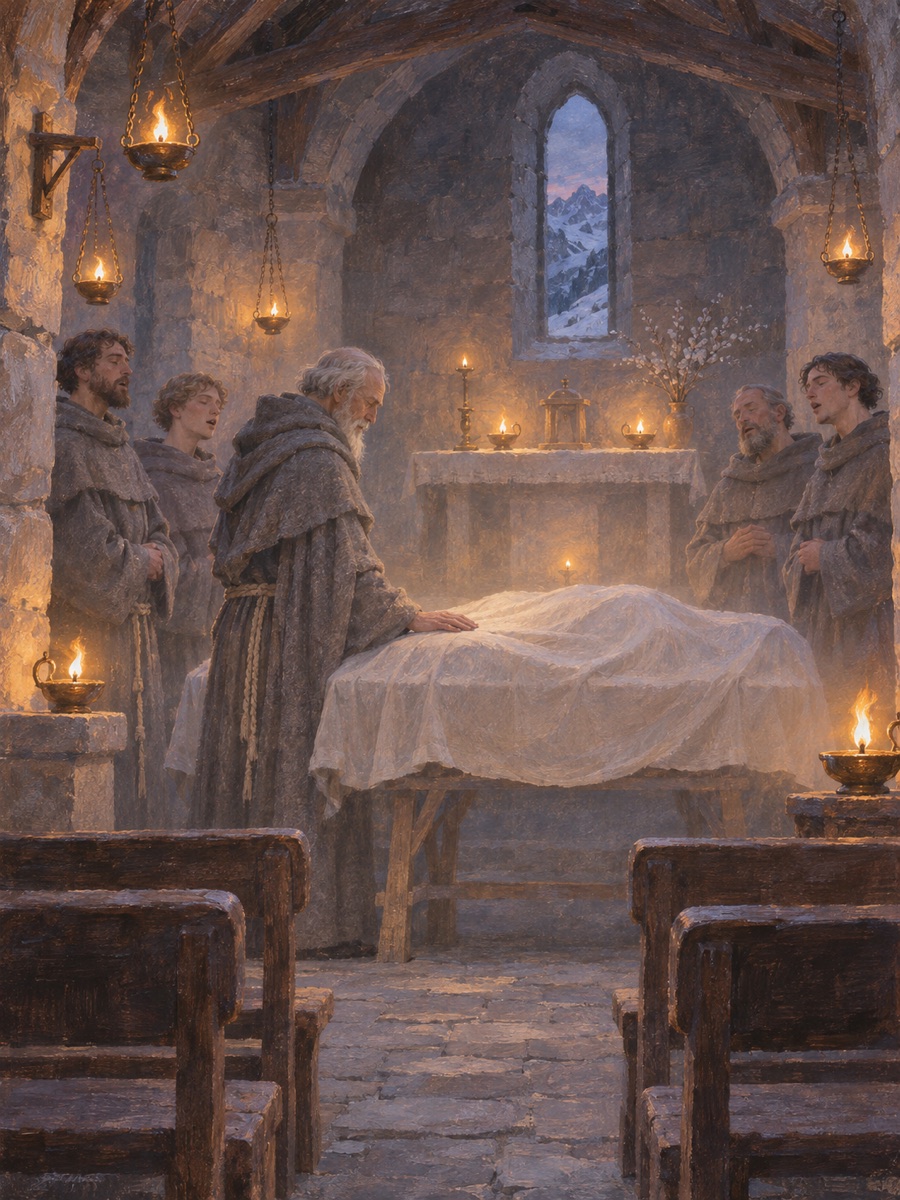
The only thing the players actually saw is his office: the shroud on its trestle in the chapel full of small lamps, with the brothers singing softly. I'd use that as his picture instead [...]
You type
Good catch. Yes, draw the shroud.
The apprentice
Brother Matthias now has the shroud picture, and I looked at it before filing it. [...] The shroud is a soft mound of linen with no head or feet showing, so the picture doesn't say whether anyone is inside. [...]
- Cost: none. Codex drew it on your ChatGPT plan.
Good to know
Section titled “Good to know”- Pictures keep your secrets. It draws only what the players have seen or been told, as above.
- One look for the whole campaign. An Image Guidance note in the vault sets the style, so every picture belongs to the same world.
- Drawing without being asked. Turn on automatic drawing
(
vault.images.auto, off unless you turn it on) and it adds pictures after a wrap-up (scenes for the session's big moments, placed in the recap) and after new notes are made. It draws last, then tells you in one line how many pictures, what drew them and any cost. With a paid service that cost is spent before you hear about it, inside your limits, and it never draws more than ten pictures unasked. Say "not now" to put a job off. - Scene pictures in recaps. Ask for "a picture of the moment the dragon woke" and it goes under the right paragraph of the session's recap.
The settings behind it
Section titled “The settings behind it”vault.images.source (what draws), vault.images.auto (drawing without
being asked) and the spending limits for a paid service. Every setting is in
Drawing pictures
and the "Drawing pictures" part of
site settings,
in the plugin docs.