

Players at the table
Checked against GM-Apprentice 1.12.98.
Two switches turn your players' campaign site into something they use during the game, on their phones:
- Live sheets. Each player marks their own hit points and other spent resources on their character sheet, and the party board on the site keeps up with everyone. Nothing needs rebuilding.
- The request box. Each character page gets a box where the player asks for a change ("spend 1 xp to raise Streetwise") or asks a question. The apprentice makes the clean changes for you and holds anything that needs a ruling.
Both work for Call of Cthulhu, GURPS and D&D, and only on a site hosted on Cloudflare Pages (free). They're off until you ask for them.
Asking for them
Section titled “Asking for them”On GM-Apprentice 1.12.98, using the Snowbound sample vault
(tag sample-v2). We typed the GM's side; the reply is the agent's own,
trimmed ([...]) but not reworded.
You type
During the game I'd like my players to update their own hit points on their character pages, and to be able to send me requests like 'can I swap a spell'. Can the site do that?
The apprentice
Yes, the site can do both. Each one is an optional feature you turn on, and neither is on yet. [...]
What has to happen first, in order:
- Publish the site. [...]
- Host it on Cloudflare Pages. Both features need Cloudflare, which is already the host set for this campaign; they won't work on GitHub Pages. During setup, add one extra permission to your Cloudflare token: Account · Workers KV Storage · Edit. That's where the live HP and the requests are stored, and adding it now saves you editing the token later.
- Turn the two features on. Each is one command run from the site folder (
setup-status-barandsetup-inbox). I can run them for you, and it's safe to run them again.
We stopped the sample run there rather than publish another copy of Snowbound. The screenshots below are from a real campaign that has both switches on: Dead End, a GURPS game another GM runs and Ant plays in.
Live sheets
Section titled “Live sheets”At the top of the sheet, the player taps − and + as the game goes. In GURPS that's hit points and fatigue points:

And the party board on the player characters page shows everyone at once, with the time it last heard from the table:
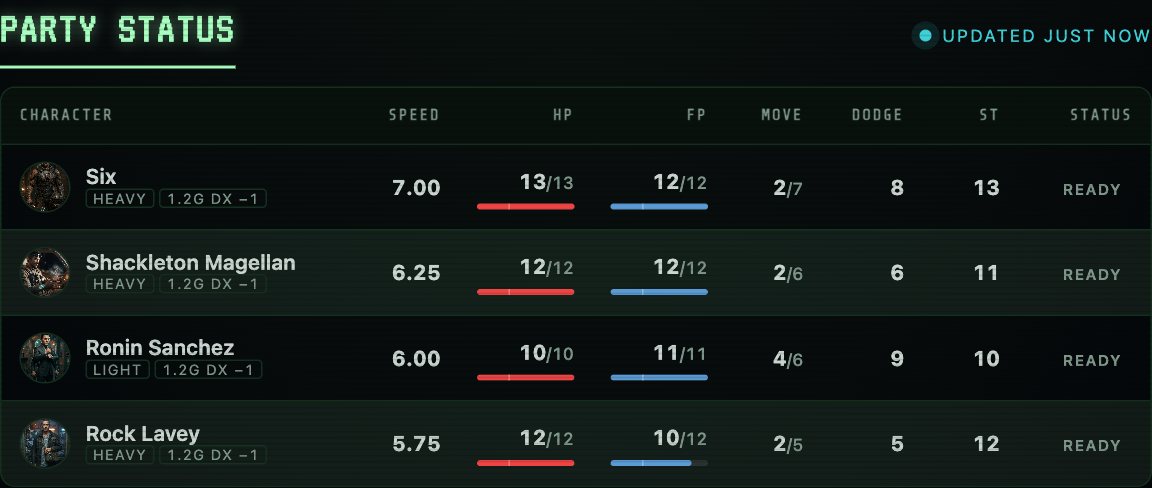
What's on the board depends on the game: armour class and spell save DC for D&D, sanity and luck for Call of Cthulhu.
The request box
Section titled “The request box”Here's the box at the top of a character page:
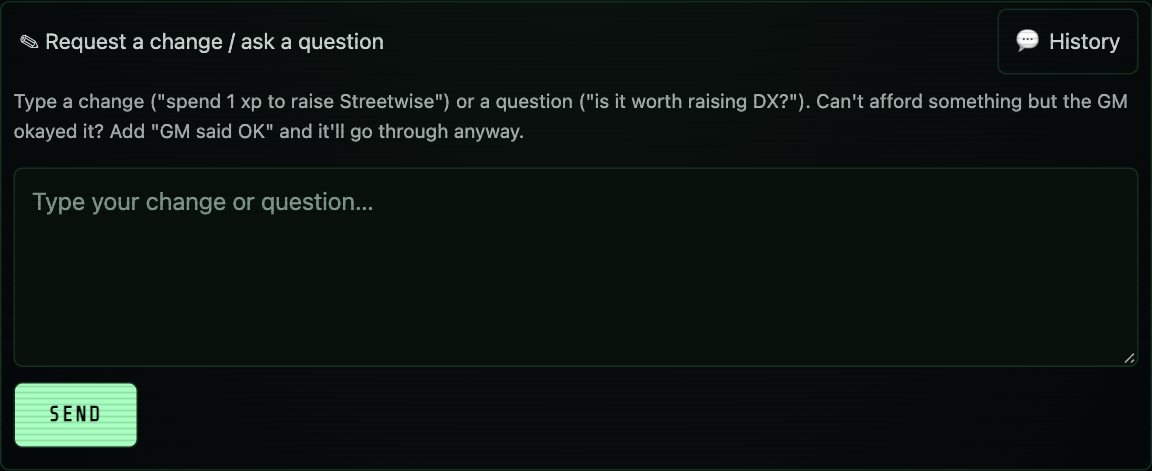
On game night:
- In a spare terminal, tell the apprentice "start your checking loop".
- It gives you a four-letter session code. Read it out to the table. Players need it to send anything.
- Leave it alone. It waits without using anything until a request arrives.
- At the end of the evening, say "stop", or just wrap up the session as usual. Either way the hit points players marked are written back into their notes.
When one does:
- A change the sheet can take (they can afford it, and it's clear which skill they mean) is made on the character's note, the site is rebuilt and published, and the player gets a tick.
- Anything unclear goes back to the player asking which they meant. If you've already said yes at the table, they add "GM said OK" and it goes through even if they can't afford it (GURPS and Call of Cthulhu; D&D has no points to spend, so the sheet's limits always hold).
- A question gets a short answer from what's on their sheet. If the answer would need something only you know, it says so instead.
The History button shows a player what they've sent and what came of it.
The settings behind them
Section titled “The settings behind them”player_site: host: cloudflare-pages features: live_stats: true inbox: trueYou don't set these by hand: the two setup commands turn them on once the storage they need exists on your Cloudflare account. Details are in the plugin's Cloudflare guide.